
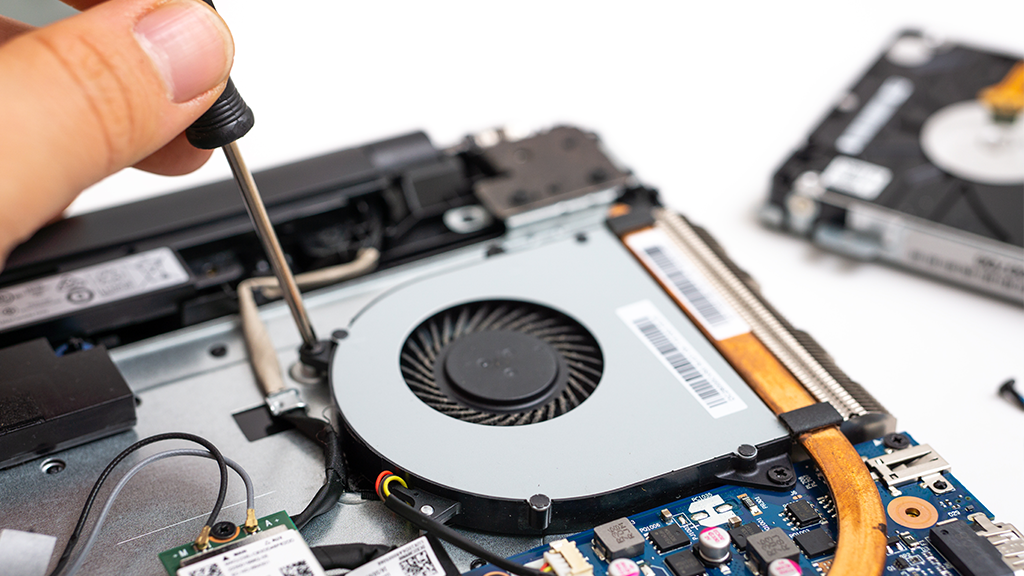
When your laptop starts overheating or suddenly becomes louder than usual, the first thing to check is the laptop fan. The cooling fan plays a huge role in protecting your device from heat damage. But like any moving part, it can fail. Understanding what causes laptop fans to stop working can help you prevent bigger issues like motherboard failure, slow performance, and random shutdowns.
In this guide, we’ll break down the most common reasons laptop fans fail, how to spot early warning signs, and what you can do to fix the problem before it leads to costly repairs.
Why Laptop Fans Fail: The Most Common Causes
Laptop fans can stop working for a lot of reasons, some simple, some technical. Below are the most common causes.
1. Dust and Dirt Build-Up
Dust is the number one reason laptop fans stop spinning. Over time, dirt, crumbs, and lint clog the cooling system, blocking airflow.
Symptoms include:
- Fan spinning loudly
- Overheating even during light use
- Laptop feels hot at the top-left or bottom area
Actionable Tip:
Schedule a professional fan cleaning every 6–12 months, especially if you use your laptop daily or live in a dusty area.
2. The Fan Motor Is Worn Out
Just like car engines, laptop fan motors wear out after years of use. A worn-out motor may spin slowly, randomly stop, or not spin at all.
Signs of a failing fan motor:
- Clicking or grinding noise
- Fan only spins when tapped
- Laptop shuts down when performing heavy tasks
If the motor is dead, the solution is usually a laptop fan replacement.
3. Faulty Fan Cable or Loose Connection
Sometimes the fan is perfectly fine — it’s just not connected properly. If the cable loosens or gets damaged, the fan won’t receive power.
This problem is common after:
- DIY repairs
- A drop or impact
- A previous technician forgetting to plug the fan back in
A quick diagnostic can confirm whether the fan is unplugged, broken, or needs replacement.
4. Software or BIOS Issues
Your fan depends on temperature sensors and settings to know when to spin. If the BIOS is outdated or corrupted, the fan won’t run correctly.
Examples:
- Fan doesn’t turn on until the laptop overheats
- Fan speed is inconsistent
- Errors on boot like “Fan Not Working”
Updating the BIOS or resetting system settings often fixes this.
5. Blocked Air Vents
Even if your fan is working, blocked vents prevent proper airflow. Using your laptop on a bed, pillow, or blanket restricts ventilation and stresses the fan.
Actionable Tip:
Use your laptop on a flat, hard surface to prevent heat buildup.
6. Overheating From Heavy Usage
Gaming, editing videos, or running heavy apps for long hours pushes laptops beyond normal temperature levels. If the fan can’t keep up, it may eventually fail.
Signs include:
- Extreme overheating
- Loud fan noise
- Performance drops
A technician can check if you need new thermal paste or a more powerful fan.
7. Manufacturing Defects
Some laptop models simply have weak cooling systems. Thin ultrabooks, MacBooks, and budget laptops sometimes use smaller fans that wear out faster.
If your model is known for fan issues, upgrading or replacing the fan may be necessary.
How to Prevent Laptop Fan Failure
Prevention is always cheaper than repair. Here are simple habits that keep your laptop fan healthy:
Keep Your Laptop Clean
Wipe the vents weekly and get a full internal cleaning at least once a year.
Use a Cooling Pad
Cooling pads help reduce the load on your internal fan.
Avoid Soft Surfaces
Use your laptop on tables instead of beds or cushions.
Watch Your Temperatures
Apps like HWMonitor or Core Temp can help track overheating early.
FAQs About Laptop Fan Repair
Why is my laptop fan making noise?
Most noisy fans are caused by dust buildup, worn-out bearings, or a loose fan blade.
Can I use my laptop if the fan stops working?
No — running a laptop without a working fan can cause severe overheating and permanent motherboard damage.
How much does laptop fan repair cost?
Repair cost depends on the brand and model. Basic cleaning is cheaper, while full fan replacement varies based on parts availability.
How long does laptop fan replacement take?
Most repairs take 30 minutes to 2 hours depending on the complexity of the disassembly.
How do I know if I need fan repair or just cleaning?
If the fan still spins but is loud, cleaning may fix it. If it doesn’t spin at all, you likely need a replacement.
FAQs About Techtronics (NYC Laptop Repair)
Does Techtronics repair laptop fans?
Yes. Techtronics provides full laptop fan repair, cleaning, diagnostics, and fan replacement for all major brands.How fast can Techtronics fix my laptop fan?
Most fan repairs are completed the same day, depending on parts availability.Do I need an appointment?
Walk-ins are welcome, but you can also schedule an appointment for faster service.What brands does Techtronics repair?
We repair MacBook, Dell, HP, Lenovo, Asus, Acer, MSI, and more.Does Techtronics offer a warranty for fan repair?
Yes. All fan replacements and repairs come with a service warranty.Conclusion
Laptop fans may be small, but they’re one of the most important parts of your device’s cooling system. When they stop working—whether from dust buildup, worn-out motors, loose connections, blocked vents, or software issues—your laptop can overheat fast. And once overheating starts, you risk slow performance, random shutdowns, and even irreversible motherboard damage.
The good news? Most laptop fan problems can be fixed quickly when diagnosed early. Staying ahead with regular cleaning, proper usage habits, and timely repairs can significantly extend your laptop’s lifespan and keep it running smoothly.
If your laptop feels hot, gets loud, or the fan stops spinning, don’t ignore it. Taking action now can save you from bigger headaches later.
Get Your Laptop Fan Fixed Today
Is your laptop overheating or making unusual noise? Does the fan stop spinning or run constantly at full speed? Techtronics is here to help.
At Techtronics, we offer:
- Same-day laptop fan repair and cleaning
- Fast diagnostics for all major laptop brands
- Affordable fan replacement with warranty
- Expert technicians who know how to fix the issue safely and correctly
Don’t wait until overheating damages your laptop.
Visit Techtronics today or book an appointment now to get your laptop running cool, quiet, and reliable again!
Top-tier Smartphone, Computer, Laptop Repair, and Data Recovery Services in NYC
At Techtronics, we offer professional, reliable, and fast service at competitive prices. Techtronics specializes in all aspects of electronic repair. With certified repair specialists skilled in integrated circuit board repair.
We stand behind our work with a 60-day guarantee. If anything goes wrong, bring it back, and we’ll make it right.
Contacts
Address: 248 W 35th St, New York, NY 10001
Contact: (212) 920-6533
Email: hello@techtronicsmobile.com
Open Hours
Monday-Friday 11AM-7PM
Saturday 11AM-6PM
Sunday 12PM-6PM
Contacts
Address: 2578 Broadway, New York, NY 10025
Contact: (212) 960-8785
Email: hello@techtronicsmobile.com
Open Hours
Monday-Saturday 11AM-7PM, Sunday 12PM-7PM
Contacts
Address: 248 W 35th St, New York, NY 10001
Contact: (212) 920-6533
Email: hello@techtronicsmobile.com
Open Hours
Monday-Friday 11AM-7PM
Saturday 11AM-6PM
Sunday 12PM-6PM
Contacts
Address: 2578 Broadway, New York, NY 10025
Contact: (212) 960-8785
Email: hello@techtronicsmobile.com
Open Hours
Monday-Saturday 11AM-7PM, Sunday 12PM-7PM